
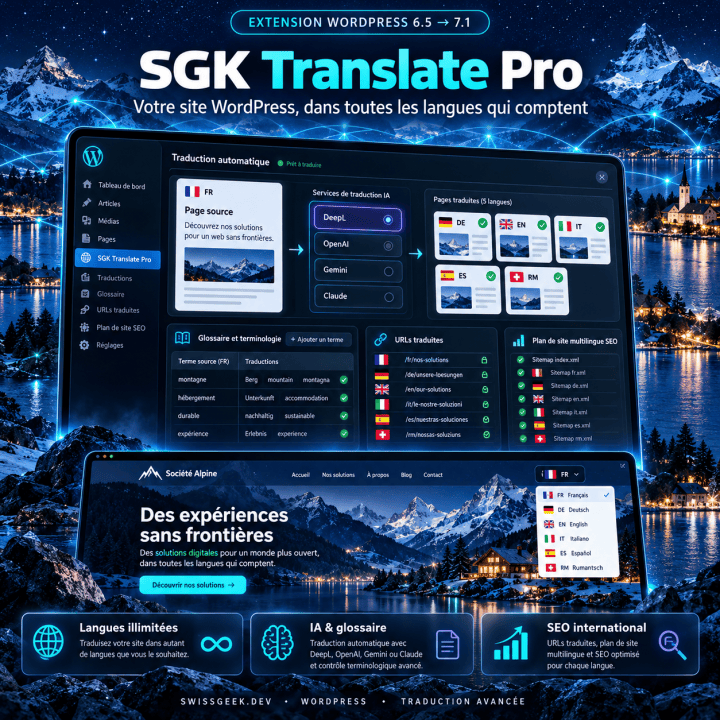

SGK Translate: your whole WordPress site in multiple languages without duplicating a single page
Translating a WordPress site often feels like a second project. Classic multilingual plugins require a copy of every page for each language, which then has to be kept up to date with every change. Online services charge monthly by word count and keep your translations on their servers. And in both cases, gaps remain: the footer, a Divi module, a button written into the theme, all stubbornly staying in French.
I created SGK Translate for my own sites and my clients' sites, bringing together what I used separately: content translation, a Loco Translate-style editor for theme and plugin texts, and AI machine translation. It reads the page as it is displayed, spots every sentence, every button and every meta tag, and replaces it with its translation, stored in your own database. You write once, in a single language.
What it doesWhat SGK Translate for WordPress does
Everything the visitor sees is translated, each language has its own URLs, and translation runs in the background while you keep control of every text.
The Pro badge marks what is reserved for the Pro edition.
The whole site translated
- Pages, posts, archives, menus, widgets, footer and custom fields displayed by the theme.
- Divi layouts (including Theme Builder templates and dynamic content), Gutenberg and Elementor; the Visual Builder is never translated.
- Hidden texts (alt, title, placeholder, aria-label), meta tags, Open Graph, Twitter and JSON-LD structured data.
- Formatting inside a sentence (link, bold, icon) is preserved.
URLs and SEO
- One URL per language: /de/, /en/, /it/…; the original language stays without a prefix.
- hreflang and x-default links, the page's lang attribute and Open Graph locale.
- Links to your own pages stay in the same language.
- Since each language has its own URLs, caching plugins work normally.
Machine translation
- New texts are queued and translated in the background (WP-Cron): the visitor never waits.
- "Translate the whole site" button: every page, post and archive is opened in each language and translated.
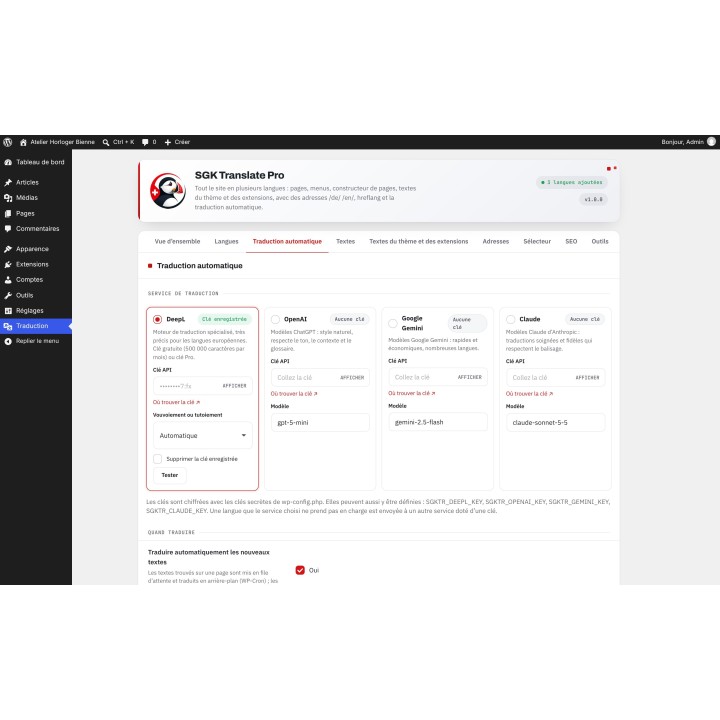
- Encrypted API keys, monthly character cap and usage tracking.
- DeepL with a choice of formal or informal address depending on the language.
Review and control
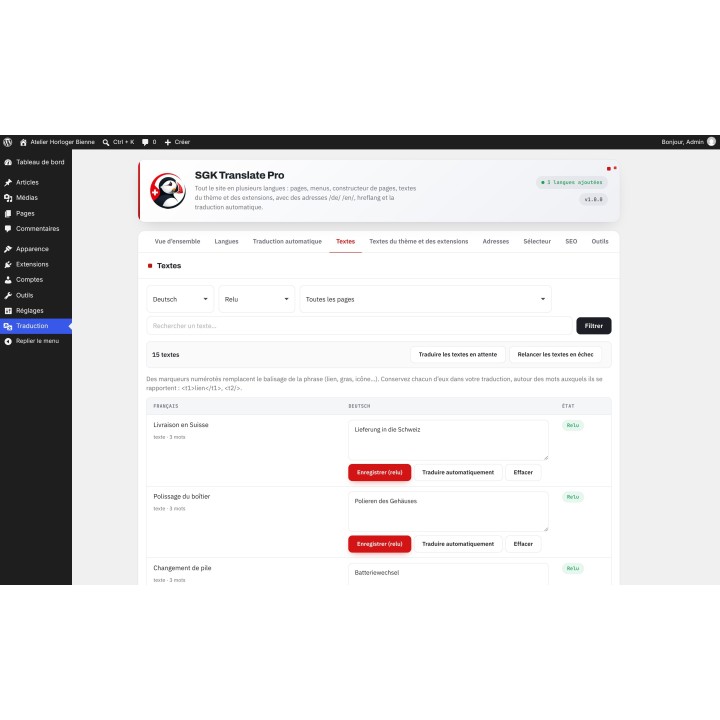
- Editor for all texts with filters by language, page, status and search.
- A reviewed text is never replaced by machine translation.
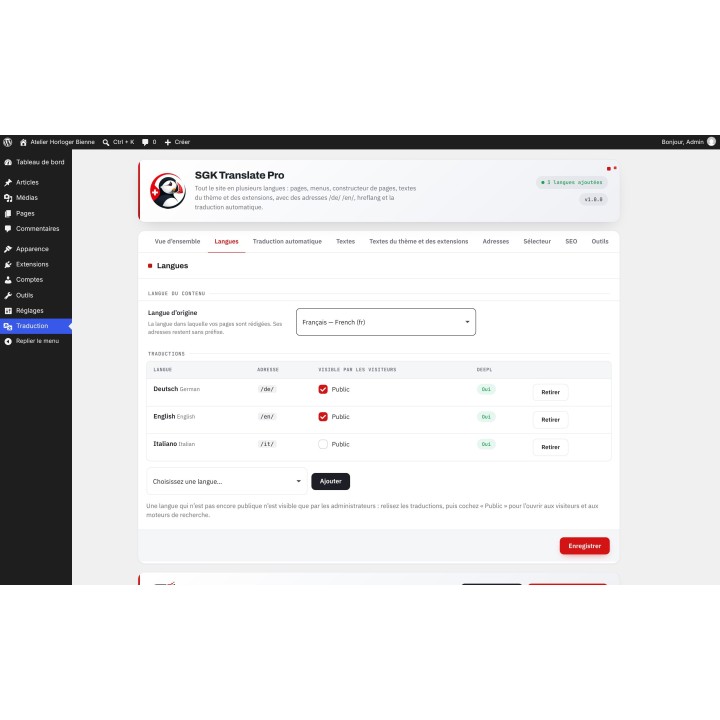
- Languages in preview for administrators before they are opened to visitors.
- Language switcher: floating button, menu item, shortcode and PHP function.
Also in Pro
- Unlimited languages, from 45 languages in the catalog, including Romansh and Swiss German Pro
- OpenAI (ChatGPT), Google Gemini and Claude in addition to DeepL, with tone, site description and glossary Pro
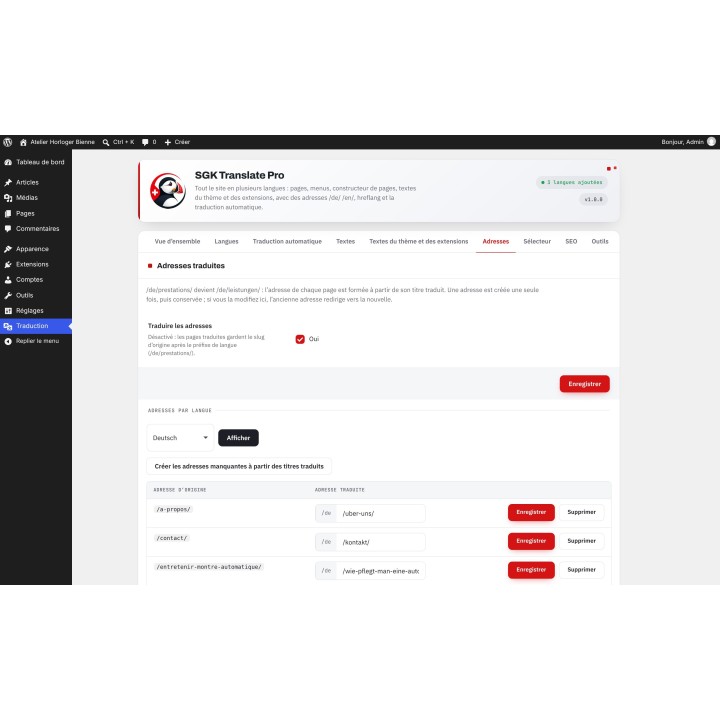
- Translated URLs (/de/leistungen/ instead of /de/prestations/), with a redirect from the old Pro URL
- Multilingual sitemap and redirection to the browser language on the first visit Pro
- Theme and plugin text editor like Loco Translate, .po / .mo / .pot export and .po import Pro
- CSV or JSON export and import, updates from the WordPress Plugins screen Pro
In practiceThree cases where SGK Translate for WordPress makes the difference
Compared to the competitionWhat you pay elsewhere
SGK Translate Pro costs €79.99 once, a lifetime licence for one site, whereas comparable multilingual plugins charge €39 to €150 per year per site.
- Paid once: no subscription to renew to keep a translated site, and the translations stay in your database.
- No page copies: plugins that duplicate every page per language require you to keep all those copies up to date.
- No per-word billing: online services charge by word count and host your translations on their servers; here, you use your own key, for example the free DeepL API Free plan (500,000 characters per month).
- Content and theme texts together: tools that only translate theme and plugin texts leave page content aside.
- To be completely honest: SGK Translate does not include translation credits, and it does not handle WooCommerce per-currency prices, which WooCommerce Multilingual offers.
Prices excluding tax as of October 11, 2026, from the vendors' websites.
Getting startedInstall SGK Translate for WordPress in 4 steps
- Download the zip from your account (Pro) or for free from the Lite listing, then in WordPress open Plugins > Add New > Upload Plugin and activate it: a Translation menu appears.
- Pro: open Translation > Licence, paste your key and click Save and verify.
- In Translation > Languages, add a language without making it public, then save an API key in Automatic translation and click Test.
- In Translation > Overview, click Translate the whole site, review in Texts, then check Public in Languages.
SGK Translate is for any WordPress site that wants to speak to its visitors in their own language without doubling its workload: showcase sites, blogs, Divi sites, and shops whose texts it translates. Start with the Lite version: one extra language, DeepL and all the basics, for free. When you want more languages, the AI of your choice, translated URLs and control over theme texts, the Pro version is made for you, paid once.
Lite or ProWhat differs between the two
Lite is free and requires no license: install it and judge for yourself on your own site. Pro adds the advanced features.
| Feature | Lite | Pro |
|---|---|---|
| Complete page translation: content, menus, page builder, theme, meta and JSON-LD | Yes | Yes |
| /de/ /en/ URLs, hreflang, x-default, language switcher | Yes | Yes |
| Text editor, statuses, protected proofread texts, language preview | Yes | Yes |
| Languages published in addition to the original language | 1 | Unlimited |
| Translation services | DeepL | DeepL, OpenAI, Gemini, Claude |
| « Traduire tout le site » en un passage | 25 URLs | No limits |
| Tone, site description and glossary | No | Yes |
| Translated URLs | No | Yes |
| Multilingual sitemap, redirect to the browser's language | No | Yes |
| Theme and plugin texts (.po / .mo) | No | Yes |
| CSV / JSON export and import | No | Yes |
| Updates from the Extensions screen | No | Yes |
| License | None | 1 site |
No loss: upload the Pro version over the installed Lite version, and your settings, languages and translations are kept.
License and support
- Free Lite, no licence. Pro: lifetime licence for one site, 12 months of updates and support included, optional renewal at €47.99 for 12 more months.
- Without a valid licence, Pro is locked: the site stays in its original language, but settings and translations are kept. A validated licence keeps working for 7 days if the licence server is unreachable.
- Pro updates from the WordPress Plugins screen; the Lite version is updated by uploading the new version.
- Ticket support at admin.swissgeek.dev.
Frequently asked questionsWhat I'm asked most often
Are my pages duplicated?
No. You write your content only once; translations are stored in their own tables and applied at display time.
Does it work with Divi?
Yes: Theme Builder templates, modules and dynamic content are translated like any other text. The Visual Builder is never translated.
Do I have to pay extra for machine translation?
SGK Translate does not include credits: you use your own service key, for example the free DeepL API Free plan (500,000 characters per month). A monthly character cap avoids unpleasant surprises.
How do I leave a word or a block untranslated?
Add the notranslate class or the translate="no" attribute, a selector in SEO > Never translate, or a rule in the Pro glossary.
What happens with a caching plugin?
Since each language has its own URLs, caching works normally. Clear a page's cache after correcting its translation.
Which versions are supported?
WordPress 6.5 and above (tested up to 7.1) and PHP 7.4 and above (tested on 8.3). Interface and guide in 6 languages.
Technical specsSGK Translate for WordPress in detail
| Platform | WordPress 6.5 → 7.1 |
|---|---|
| PHP | PHP 7.4 → 8.3 |
| Tested themes | Divi |
| Technical name | sgk-translate |
| Current version | 1.0.2 (11/10/2026) |
| Languages | 6 languages |
| Good to know | Divi, Gutenberg and Elementor; WooCommerce texts translated like the rest of the site |
| Price | €79.99 — Pro edition, lifetime license for one site |


0 comments